



A Pokédex meant to be explored #
This college project started as a way to learn Flutter against a real public data source. It became a mobile-first browser Pokédex: search by name or number, filter and sort the list, save favorites, play trivia, and open a Pokémon profile without losing the context of the search.
The detail page is the center of the application. About presents identity, biology, abilities, forms, and the complete evolution family. Stats compares base stats and type effectiveness. Moves follows the selected game version. Other collects encounter locations and additional data. The clip below follows that path with Eevee, whose eight branches make it a useful stress test for the evolution layout.
Navigation diagram #
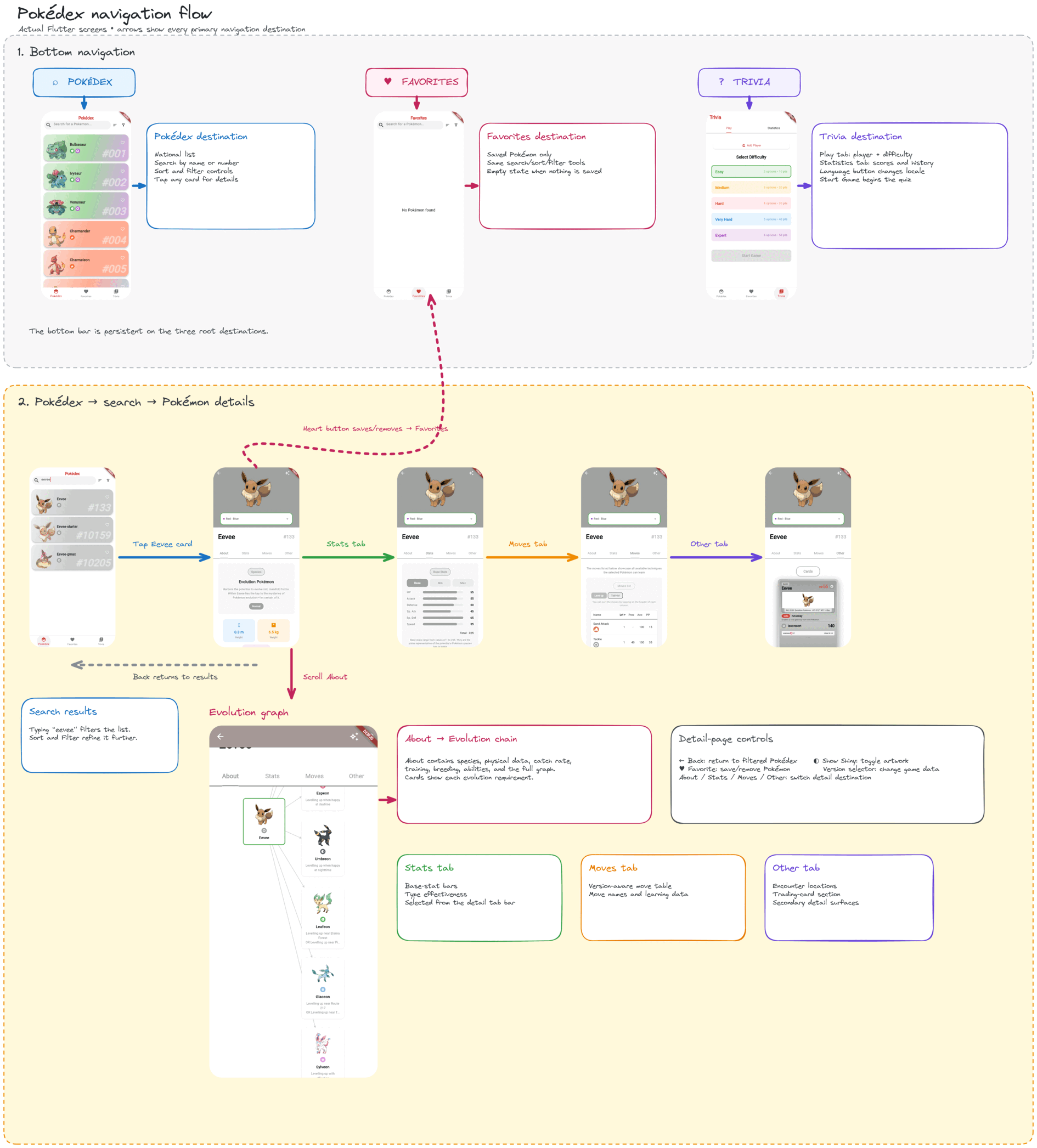
PokéAPI stores a family tree, not a linear evolution chain #
PokéAPI’s REST model represents an evolution chain as a recursive tree. A chain has a root ChainLink; every link contains one species, the conditions under which it reached that stage in evolution_details, and zero or more children in evolves_to. A linear family is simply a tree with one child per level. Eevee is the revealing case: one Eevee link fans out into Vaporeon, Jolteon, Flareon, Espeon, Umbreon, Leafeon, Glaceon, and Sylveon.
Those branches are not interchangeable labels. Evolution details encode the trigger and its constraints: level, item, time of day, happiness, affection, known move or move type, location, weather, party state, trade conditions, and more. The official PokéAPI evolution documentation describes that recursive contract.
This app queries PokéAPI’s GraphQL data instead. The same family arrives as a normalized collection of species. Each record has an id and an evolves_from_species_id; evolution rows carry trigger, item, level, happiness, affection, time, and location. The domain model indexes those records as parent id → children, which restores the tree without assuming that every family has exactly three stages.
evolutionchain {
  id
  pokemonspecies(order_by: {id: asc}) {
    id
    name
    evolves_from_species_id
    pokemonevolutions {
      min_level
      min_happiness
      min_affection
      time_of_day
      evolutiontrigger { name }
      item { name }
      location { id }
    }
  }
}
How to create the evolution graph #
The graph renderer does not hard-code Bulbasaur’s three stages or Eevee’s eight outcomes. It creates one node per species, then creates a directed edge from the parent identified by evolvesFromSpeciesId to that species. GraphView receives the resulting tree and the Sugiyama algorithm assigns levels and minimizes crossings. Families with more than two siblings switch to a left-to-right orientation so broad branches use the screen more effectively; smaller families remain top-to-bottom.
final graph = Graph()..isTree = true;
final nodes = <int, Node>{};

for (final species in chain.species) {
  final node = Node.Id(species.speciesId);
  nodes[species.speciesId] = node;
  graph.addNode(node);
}

for (final species in chain.species) {
  final parent = nodes[species.evolvesFromSpeciesId];
  final child = nodes[species.speciesId];
  if (parent != null && child != null) graph.addEdge(parent, child);
}

final configuration = SugiyamaConfiguration()
  ..nodeSeparation = 40
  ..levelSeparation = 70
  ..orientation = maxVerticalNodes > 2
      ? SugiyamaConfiguration.ORIENTATION_LEFT_RIGHT
      : SugiyamaConfiguration.ORIENTATION_TOP_BOTTOM;

return GraphView.builder(
  graph: graph,
  algorithm: SugiyamaAlgorithm(configuration),
  autoZoomToFit: true,
  builder: (Node node) => EvolutionSpeciesCard(
    species: speciesMap[node.key!.value as int]!,
  ),
);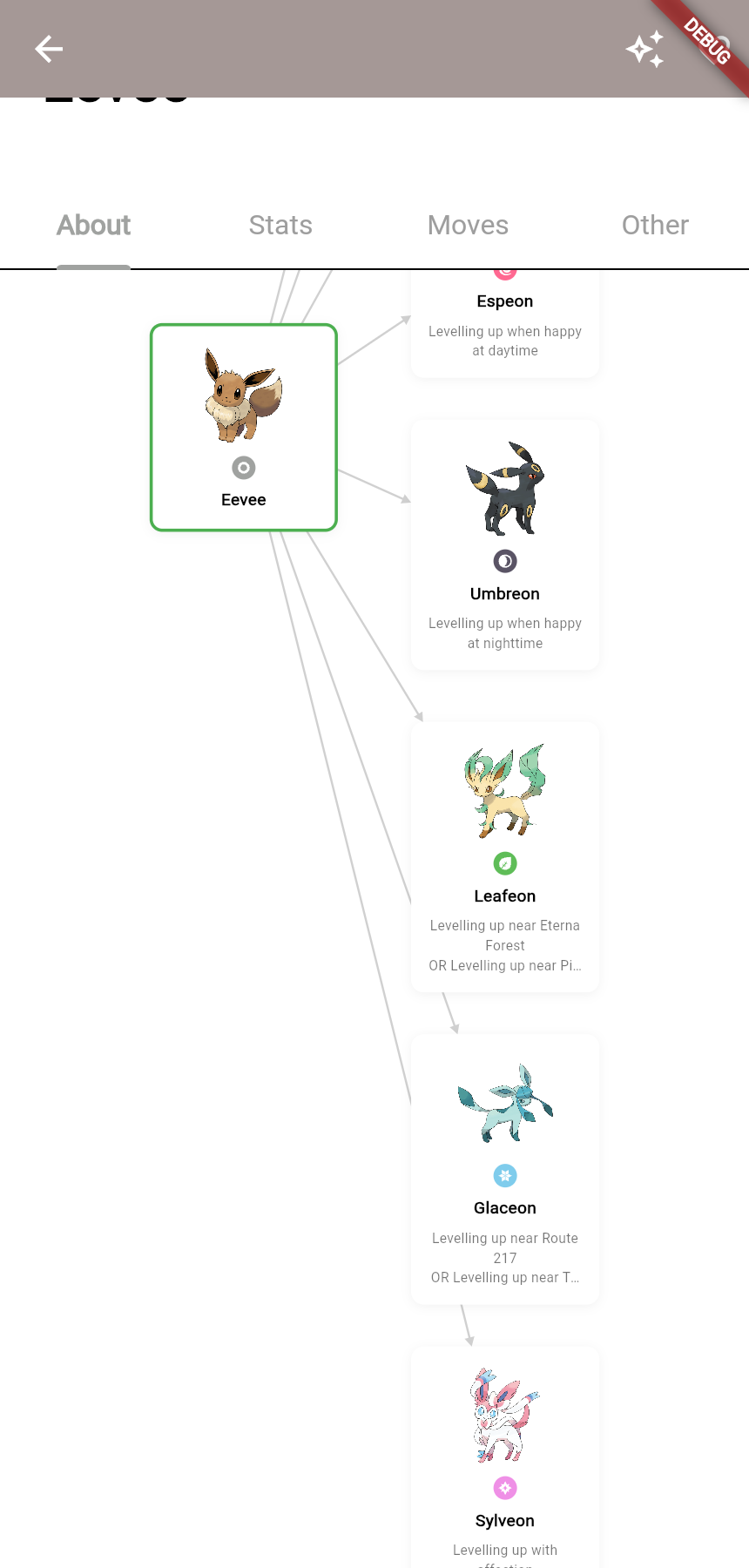
Something I did not expect, as someone who did not know much about Pokémon, was that evolutions are not always linear. Eevee’s evolution family forms a tree, so I had to design a branching graph, attach each species to its parent, and let the layout algorithm arrange the resulting levels.